Understanding the insta360 Camera and Its Features
Introduction to 360-degree Photography
As technology advances, the way we capture moments continues to evolve. One of the most exciting developments in photography is 360-degree photography, which allows us to capture a panoramic view of our surroundings in a single shot. This immersive photography offers a unique perspective that traditional photography simply can’t replicate, enabling viewers to experience environments as if they were truly there. The insta360 camera exemplifies this innovation, providing users with tools to create stunning 360-degree images and videos with ease.
Key Features of the insta360
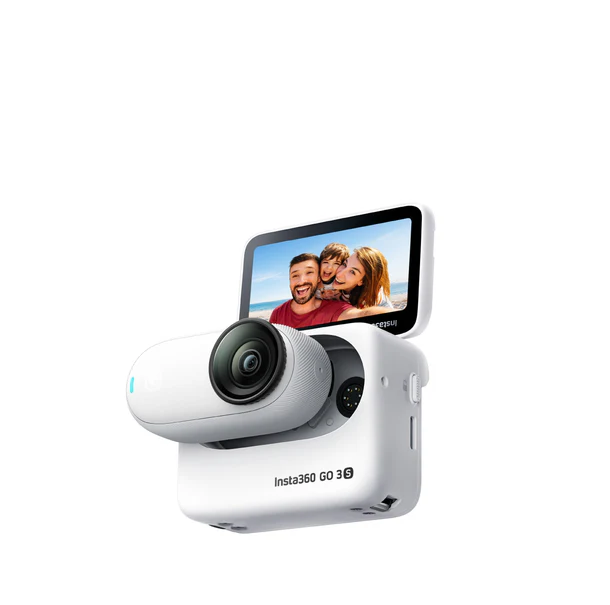
The insta360 camera is equipped with multiple features that enhance its functionality. Here are some standout characteristics:
- Dual-Lens Technology: This feature allows for seamless 360-degree capture, ensuring no part of the scene is missed.
- Image Stabilization: The built-in stabilization technology minimizes blurriness, offering smooth footage even in motion.
- Versatile Shooting Modes: Users can choose from numerous shooting modes, including time-lapse, bullet time, and enhanced HDR.
- Advanced Editing Tools: The accompanying software enables users to edit and customize their footage professionally.
- Live Streaming Capabilities: Video can be streamed live, adding another layer of interactivity for viewers.
How insta360 Enhances Your Outdoor Experience
Adventure seekers and outdoor enthusiasts find that the insta360 revolutionizes their experience. Whether hiking in the mountains, surfing at the beach, or exploring cityscapes, the camera’s compact design makes it easy to carry and utilize. The ability to capture immersive content allows individuals to relive their adventures in a dynamic way, sharing the excitement with friends, family, and followers online.
Getting Started: Setting Up Your insta360
Unboxing and Initial Setup
When you first unbox your insta360, take a moment to appreciate the streamlined design. The package typically includes the camera, a charging cable, a user manual, and essential accessories. Start by charging the camera fully before use to ensure optimal performance. Familiarize yourself with the camera’s buttons and features by referencing the user manual, keeping in mind that a little understanding upfront can greatly enhance your experience.
Connecting to Your Devices
Before you can start capturing stunning 360-degree photos, you’ll need to connect your insta360 to your smartphone or tablet using Bluetooth. Download the insta360 app, which is compatible with both iOS and Android devices. Once installed, open the app and follow the prompts to connect. This integration allows for easy sharing, editing, and managing your captured media directly from your mobile device.
Basic Camera Settings to Know
Familiarizing yourself with the basic settings of your insta360 can significantly enhance your photography skills. Key settings include resolution, field of view, and frame rate. Adjusting these settings according to your specific shooting conditions can drastically improve the final output. A higher resolution is ideal for capturing finer details, whereas a lower resolution may be appropriate for quick-sharing scenarios, balancing quality and file size.
Advanced Techniques for Stunning Shots with insta360
Utilizing Creative Modes and Features
The insta360 is loaded with creative modes that can elevate your content beyond the ordinary. For example, the “Bullet Time” feature allows you to create dynamic shots with a spinning effect, making your images stand out. Experiment with different modes such as “Free Capture,” which lets you reframe your shots in post-production, providing unparalleled flexibility in storytelling through your photos.
Editing Your 360-degree Photos
Editing is where your creativity can truly shine with the insta360. The accompanying app features intuitive tools allowing you to trim clips, add music, apply filters, and even insert text overlays. Advanced aerial views and zoom options help create visually striking narratives. The editing suite simplifies the process, ensuring you can focus on creativity without getting bogged down by technical complications.
Sharing Your Adventures Online
Once you’ve captured and edited your stunning 360-degree footage, sharing it is the final step. The insta360 app allows you to instantly share your videos and photos on social media platforms like Instagram, Facebook, and YouTube. These platforms have integrated support for 360-degree content, ensuring your audience can appreciate the immersive experience fully.
Common Challenges and Troubleshooting Your insta360
Frequently Encountered Issues
Like any technology, the insta360 may present some challenges. Common issues include connectivity problems with devices, battery draining quickly, or difficulty navigating the app. Understanding common pitfalls can streamline your experience and keep frustrations to a minimum. Consulting the user manual or community forums can often provide solutions to these prevalent issues.
Best Practices for Maintaining Your Camera
To ensure the longevity of your insta360, follow these maintenance tips: regularly clean the lenses using a microfiber cloth, avoid exposing the camera to extreme temperatures, and double-check battery levels before outings. Proper storage, especially after lengthy use, is also essential. Keeping your camera in a protective case when not in use will help guard against physical damage.
When to Seek Professional Help
If you encounter persistent issues that troubleshooting cannot resolve, it may be time to seek professional help. This includes situations where the camera isn’t functioning correctly after software updates or if physical damage occurs. Refer to the warranty specifications to understand the repair policy or pursue customer support for assistance.
Measuring Success: Performance Metrics for Your Photos
Understanding Viewer Engagement
Measuring how your audience engages with your 360-degree content is crucial for improvement. Analyze metrics such as likes, shares, and comments to gauge viewer interest. Additionally, tracking how long viewers spend on your content can indicate effectiveness. Use this data to adjust your shooting and editing strategies, ensuring your future projects resonate with your audience.
Using Analytics to Improve Content
Engagement analytics can drive valuable insights into your content’s performance. Use built-in analytics on social media platforms to understand audience demographics and preferences. This information can guide you in creating tailored content that aligns with viewer interests, ultimately enhancing engagement and fostering a loyal audience base.
Setting Goals for Future Projects
Evaluate past projects to set achievable goals for future shoots. Goals could include increasing views by a certain percentage, improving engagement rates, or experimenting with new techniques. Having clear, measurable objectives helps create focus and purpose in your photography, challenging you to innovate and enhance your 360-degree storytelling abilities.
FAQs:
Q1: What is insta360 mainly used for?
A: The insta360 camera is used for capturing immersive 360-degree photos and videos, ideal for adventures and events.
Q2: Can I edit my images from the insta360?
A: Yes, insta360 offers built-in editing tools to enhance and customize your 360-degree content before sharing.
Q3: Is the insta360 camera beginner-friendly?
A: Absolutely! It is designed with user-friendly features, making it accessible for all skill levels.
Q4: How long does the battery last on insta360?
A: Depending on usage, the battery typically lasts between 60 to 90 minutes, perfect for short shoots.
Q5: What devices can connect with insta360?
A: The insta360 camera can connect seamlessly with most smartphones via Bluetooth for easy access to your footage.